Novator
Novator
Redesigned a live enterprise platform used by 10,000+ employees — without taking it offline for a single day
Redesigned a live enterprise platform used by 10,000+ employees — without taking it offline for a single day
Role: UX/UI Designer
Product type: Electronic Document Management System
Platform: Desktop + mobile
Country: Kazakhstan
Year: May, 2025-current
All interface screenshots have been translated from Russian
(the original product language) into English for portfolio purposes.

Context & My Role
Novator is an enterprise document management platform used daily by 10,000+ employees across several large organizations in Kazakhstan — covering HR, procurement, archives, analytics, and communications across desktop and mobile.
I was brought in as the sole designer with full redesign ownership. The mandate: turn an inconsistent, friction-heavy system into a coherent product — while it stayed live and in active use. No downtime. No parallel version. Real users depending on it every day.
Novator is an enterprise document management platform used daily by 10,000+ employees across several large organizations in Kazakhstan — covering HR, procurement, archives, analytics, and communications across desktop and mobile.
I was brought in as the sole designer with full redesign ownership. The mandate: turn an inconsistent, friction-heavy system into a coherent product — while it stayed live and in active use. No downtime. No parallel version. Real users depending on it every day.
Problem
1. Too many steps for routine tasks.
1. Too many steps for routine tasks.
Actions that should take 2–3 clicks required 6–8. For a system processing hundreds of documents daily, this translated into significant lost time —
and a growing stream of support requests from frustrated users.
2. Inconsistent UI across modules.
2. Inconsistent UI across modules.
Each module had evolved independently over time. Buttons, forms and component states all looked and behaved differently — making the product feel like three separate tools held together with tape.
Each module had evolved independently over time. Buttons, forms and component states all looked and behaved differently — making the product feel like three separate tools held together with tape.
3. No mobile experience whatsoever.
3. No mobile experience whatsoever.
Employees working on-site or away from a desktop had no way to check document statuses, submit requests, or confirm their attendance. A critical gap in a system built around daily operations.
Before each module
I studied how similar functions worked in the old system —
to understand user expectations.


Process
I started with a full audit of the existing system — mapping every screen, state, and user flow across all three desktop modules. This gave me a clear picture of where the inconsistencies were concentrated and which routes were generating the most friction.
In parallel, I ran a competitive analysis of similar enterprise document management tools to benchmark navigation patterns and mobile-first approaches in the B2B space.
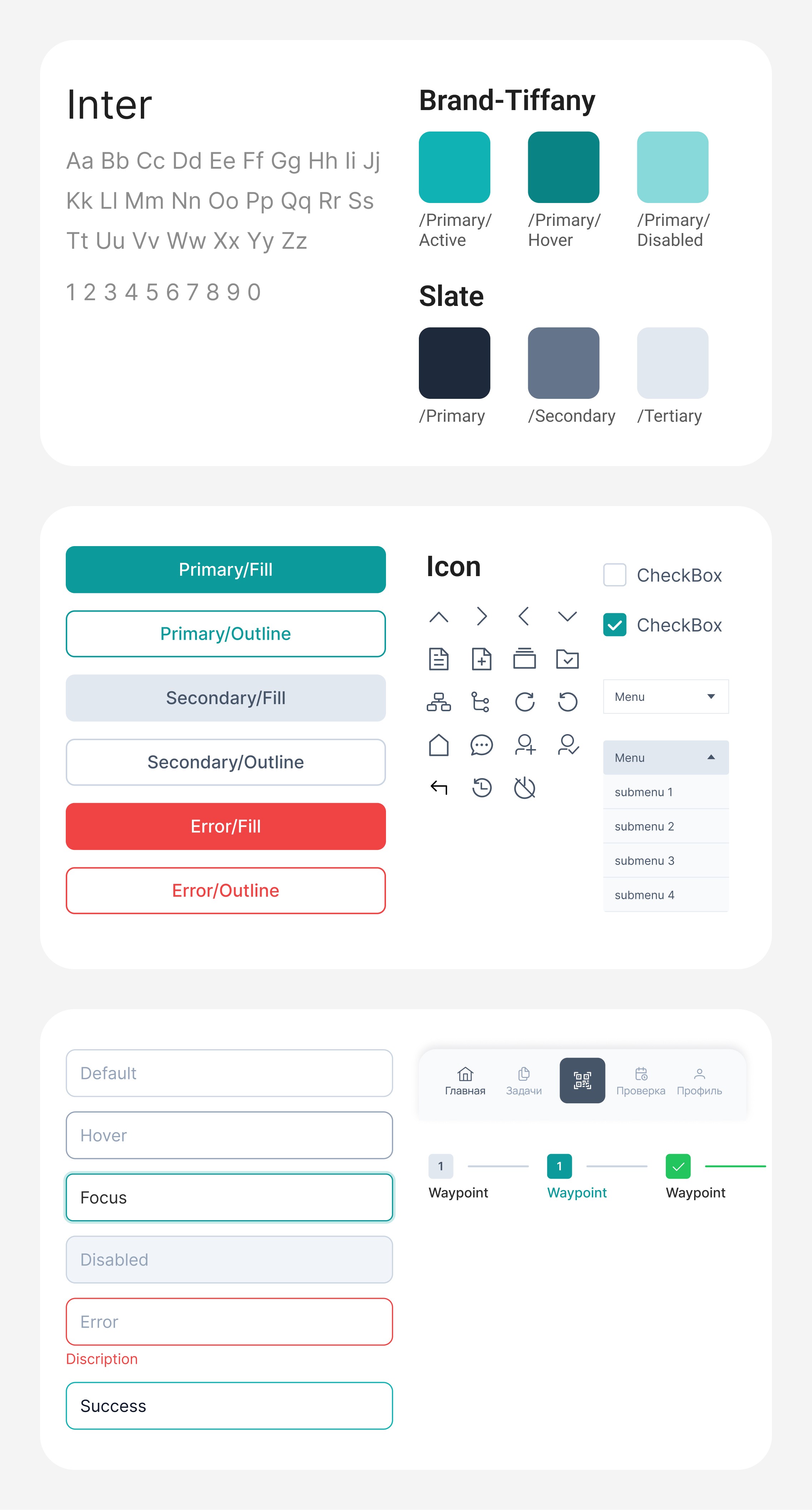
From there, I rebuilt the UI Kit within the approved visual style — establishing a shared component library that could scale consistently across all modules. Key flows were restructured to reduce step counts. Prototypes were tested iteratively before handoff to development.
I started with a full audit of the existing system — mapping every screen, state, and user flow across all three desktop modules. This gave me a clear picture of where the inconsistencies were concentrated and which routes were generating the most friction.
In parallel, I ran a competitive analysis of similar enterprise document management tools to benchmark navigation patterns and mobile-first approaches in the B2B space.
From there, I rebuilt the UI Kit within the approved visual style — establishing a shared component library that could scale consistently across all modules. Key flows were restructured to reduce step counts. Prototypes were tested iteratively before handoff to development.

Throughout the entire project, I worked in close collaboration with the development team. Every design decision was discussed together — whether it was technically feasible, whether it would create unnecessary load on the system, how long it would take to build, and whether alternative solutions could achieve a similar UX outcome with less effort. This wasn't a hand-off workflow. It was genuine collaboration where design was shaped by real product constraints from the very beginning.
Throughout the entire project, I worked in close collaboration with the development team. Every design decision was discussed together — whether it was technically feasible, whether it would create unnecessary load on the system, how long it would take to build, and whether alternative solutions could achieve a similar UX outcome with less effort. This wasn't a hand-off workflow. It was genuine collaboration where design was shaped by real product constraints from the very beginning.
Five Key Modules
Document Management
The core operational module of the system. Includes a filterable list of all type documents with status tracking, the full document lifecycle from creation through to execution, and a dedicated screen for monitoring progress. Navigation structure was redesigned and step counts on key routes were significantly reduced.
SIC (Social Identification Card) is a citizen's record in the system, linked to their national ID (IIN). The module covers the full lifecycle: registration, editing, deregistration upon death, emigration abroad, ID deletion, and ID restoration.
I structured the module around IIN search as the entry point — one field, one click, and the operator sees the full citizen profile with all available actions. Destructive operations (death registration, deletion) require a separate confirmation step with an explicit description of consequences.


HR — Candidates
Built for HR specialists. Features a searchable, filterable candidates list, individual candidate profiles, and a multi-step form for adding new candidates. Data entry was simplified without removing any required fields.
A module for tracking all system changes — who changed what and when. Audit is a control and investigation tool, not a daily working screen.
I focused on a filter system: by date, user, event type, and object.
The results table was built on "most important visible immediately" — date, action, executor — without opening each record. Details expand on click.


Attendance —
Dashboard and Photo Verification
A module for tracking employee presence. Includes a workplace photo upload page used to confirm attendance, and an analytics dashboard giving managers a clean, scannable overview of attendance data.
A module for tracking employee presence. Includes a workplace photo upload page used to confirm attendance, and an analytics dashboard giving managers a clean, scannable overview of attendance data.


Home Screen — Status Widgets
The app's main entry point. Live widgets showing each employee's current status —
at work, out of office, on leave — with quick access to key actions.
The app's main entry point. Live widgets showing each employee's current status —
at work, out of office, on leave — with quick access to key actions.


Attendance Check and Document Creation
Attendance verification directly from a mobile device. Incoming document creation —
a task that previously required a desktop, now available on the go.
Attendance verification directly from a mobile device. Incoming document creation —
a task that previously required a desktop, now available on the go.


Outcomes
What shipped: 15+ fully redesigned modules across desktop and mobile,
200+ screens, 9 months — while the platform stayed live throughout.
Who it serves: 10,000+ employees across multiple large organizations
in Kazakhstan.
Observed impact: Support team reported a significant drop in navigation-related tickets after launch. Users began completing document workflows without assistance — a first for the platform.
What I learned: In a live-redesign context, consistency matters more than innovation. I prioritized familiar interaction patterns over novel UI,
and it paid off.
What shipped: 15+ fully redesigned modules across desktop and mobile,
200+ screens, 9 months — while the platform stayed live throughout.
Who it serves: 10,000+ employees across multiple large organizations
in Kazakhstan.
Observed impact: Support team reported a significant drop in navigation-related tickets after launch. Users began completing document workflows without assistance — a first for the platform.
What I learned: In a live-redesign context, consistency matters more than innovation. I prioritized familiar interaction patterns over novel UI,
and it paid off.
